
RFQ automation must preserve commercial meaning
An RFQ is a request for quotation. In distribution, the hard part is often translating a buyer’s language into the correct sellable product and terms. Email, spreadsheets and attachments may describe the same item differently. An AI-generated quote can look polished while using the wrong pack, substitute or delivery assumption.
Design automation around a checked commercial record. The process should connect the original enquiry to product identity, quantity, unit of measure, price basis, availability, delivery terms and the person authorized to release the quote.
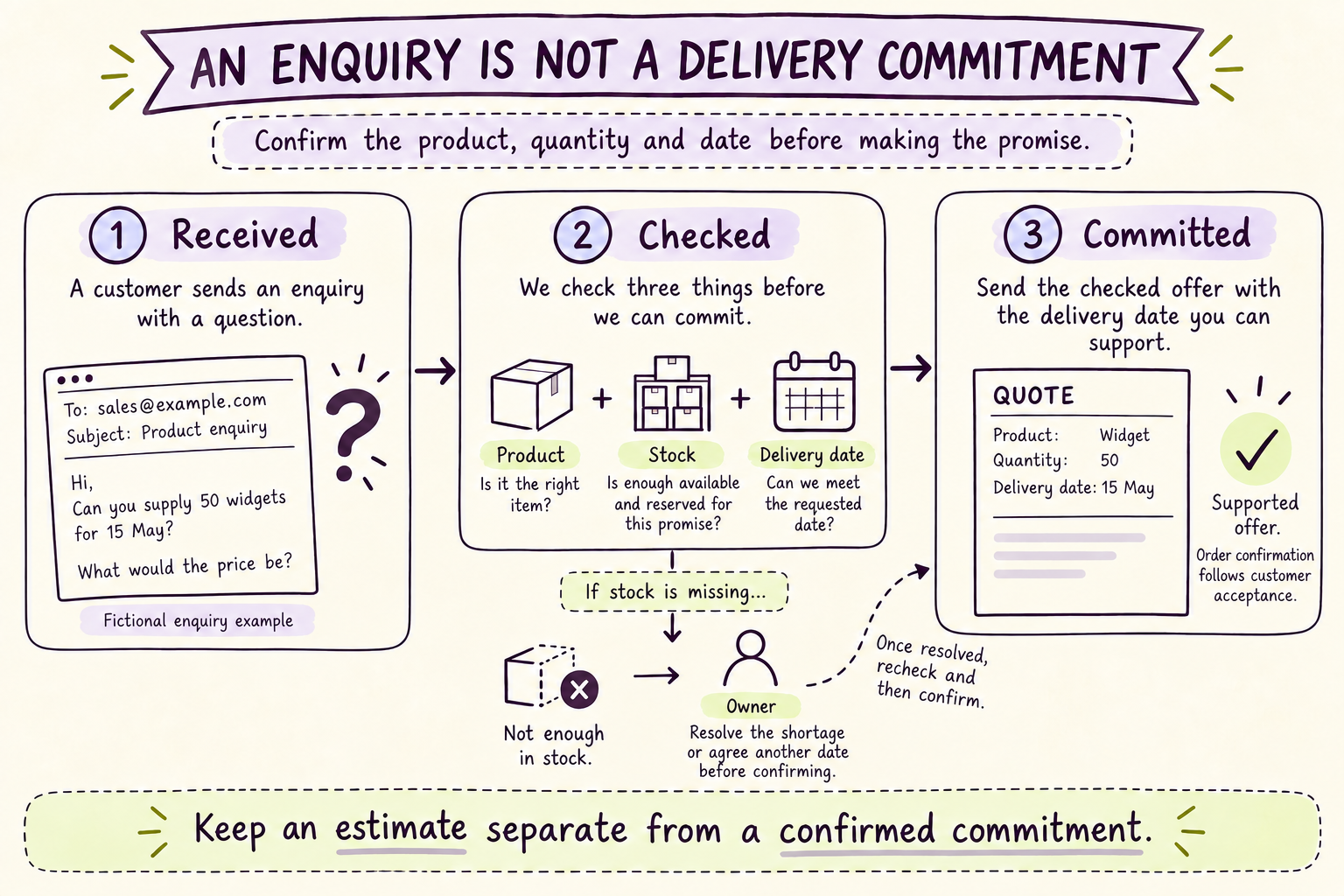
Read the visual explanation
Record the enquiry without turning it into a delivery commitment.
Check the product, available stock, capacity and delivery terms.
Keep the supported quote and the customer's accepted order as distinct states.
Illustrative teaching example. The steps above are repeated in readable text below; depicted records are not customer results.
Normalize the enquiry without losing the source
Extract each line into a structured draft while retaining the original wording and attachment reference. Preserve buyer identifiers, requested dates and stated restrictions. Distinguish absent values from zero or “not required.” A missing requested date should remain missing until a rule or a person resolves it.
Use the customer account record to identify contract terms and permitted channels. Do not create a new account merely because the email address differs from a known contact. Duplicates can fragment purchase history, credit checks and pricing.
Match product and unit of measure together
Match the item code, specification and pack definition as one decision. A supplier code may map to more than one internal item, and an item can have several sale units. Retain the mapping evidence. Low-confidence matches and substitutions should be routed for a decision.
In a fictional enquiry for 24 cases, ten units per case implies 240 units while twelve implies 288. The workflow should not silently choose the most recent document if the buyer explicitly requested a different pack. Confirm intention, update the draft and keep the reason alongside the quote. This is a designed example, not a client case study.
Validate price, stock and promise separately
A price can be valid while stock is unavailable. Stock can be available at one location while the promised delivery date is infeasible. Check contract price, currency, validity dates, minimum quantities and approval thresholds. Check available-to-promise stock according to the organization’s own allocation rules.
Treat delivery estimates as estimates unless confirmed by an authorized source. Recheck time-sensitive information before release. When a quote waits overnight for approval, an earlier inventory check may no longer be sufficient. Define exactly which changes invalidate the draft.
Make the exception queue actionable
Each unresolved line should carry the conflicting values, source references, proposed next action and accountable owner. “Needs review” is too vague. “Buyer requests ten-unit case; catalog offers twelve-unit case; confirm acceptable pack” tells a specialist what to resolve.
Separate specialist resolution from customer authority. A delivery specialist can obtain missing information and prepare corrected work. Agreed discount, credit and release decisions remain with designated owners. After sending the approved quote, record its version and follow-up date in the sales system.
Measure accepted quotes and order movement
Track eligible enquiries, first checked response time, quote corrections, unresolved line count and accepted orders. Segment new accounts from established contract buyers. Count reopened quotes and credit-related holds rather than hiding them in an overall average.
A faster draft is useful only if it helps the buyer make a sound next decision. Compare conversion and contribution over a suitable window, accounting for mix, availability and seasonality. Looqus can build this process around the distributor’s systems and carry the agreed follow-through; pricing and delivery authority remain scoped.
RFQ release checklist
Use this starting worksheet to agree the process with the people who will operate it. Replace the examples with your own rules and owners.
| Field | Check | Hold the quote when |
|---|---|---|
| Product | Match buyer wording to a unique sellable item. | A code has multiple plausible matches |
| Quantity | Preserve requested quantity and sale unit. | Pack definition or unit conversion conflicts |
| Price | Apply correct contract, currency and validity. | Price is expired or outside authority |
| Stock | Read available-to-promise under allocation rules. | Availability is stale or insufficient |
| Delivery | Use an authorized lead-time source. | Requested date has no confirmed basis |
| Approval | Match released version to approved version. | Commercial fields changed after approval |
| Follow-up | Record recipient, quote version and next action. | Delivery failed or ownership is missing |
Sources and scope
This is Looqus’s practical design guidance. Worked scenarios are illustrative; they are not client results or guaranteed outcomes. The sources below provide the referenced platform or engineering context.
AI does the work.We own the outcome.
Prepare quotes from checked items, quantities and commercial terms, with clear responsibility for resolving missing confirmations before an offer reaches the buyer.
- Agree the result
- Connect the work
- Own the follow-through