
Effective estimate follow-up helps a customer make a decision about a specific piece of work. It confirms that the current estimate reached the right person, identifies unresolved questions and records whether the customer wants to proceed, revise, postpone or decline. A reminder sequence is useful only while it supports that decision.
For a service business owner, unanswered estimates hide several different problems. The customer may not understand the scope, need a different date, be comparing offers, lack approval authority or no longer need the service. Some quotes may be stale or incorrectly addressed. Sending the same “just following up” message to every record treats those problems as though they were identical.
This guide focuses on the period after an estimate or quote has been prepared, not initial lead qualification. It suits maintenance, installation, cleaning, landscaping and other services with a defined proposal before delivery. The examples are synthetic, and the operating recommendations need to fit the business's commercial terms and applicable communication rules.
Define what was sent and what the customer can approve
Businesses use “estimate” and “quote” differently. In your own process, state whether the document is an indicative range, a fixed offer subject to stated terms, or a proposal requiring inspection or further information. Do not let the follow-up message promise certainty that the underlying document does not provide.
The current version should make the scope, exclusions, assumptions, price basis, relevant taxes or charges, validity period and next step understandable. If the proposal requires customer-supplied access, measurements or approvals, make that dependency visible. Unclear proposals generate avoidable questions that a reminder cannot solve.
Give every version a stable identifier and status. Jobber's quote documentation, for example, distinguishes an awaiting-response quote from later stages and supports a customer approval or change-request process. Whatever software is used, align the internal status with what the customer has actually done. Jobber quote basics
A click on a proposal is not approval. An approved quote is not necessarily a confirmed appointment, payment or completed job. Define those stages explicitly so the sales report and delivery team are not operating from different assumptions.
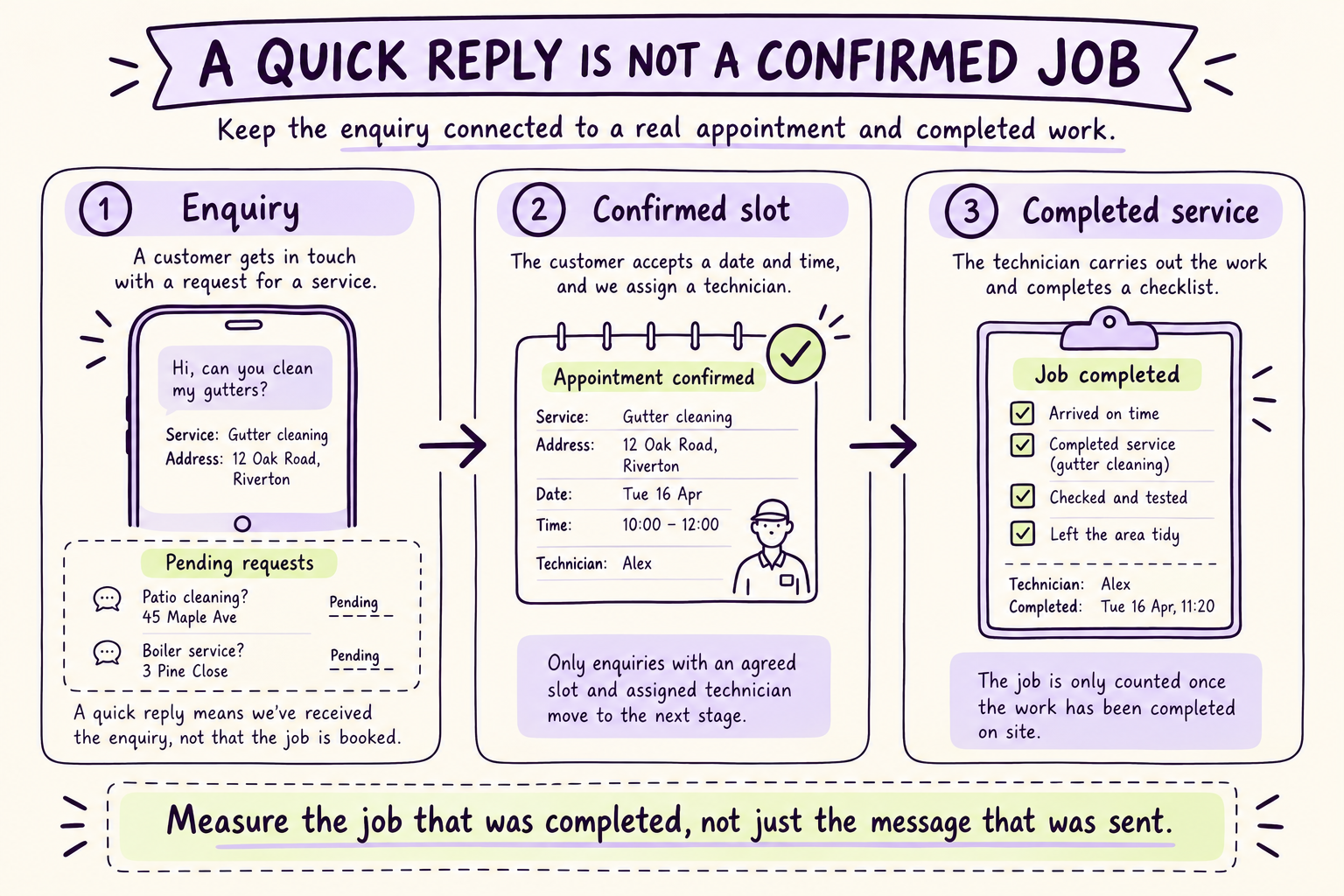
Read the visual explanation
Clarify what service the customer needs and where.
Confirm a real slot and the person responsible for attending.
Record completed work or an honest resolution of the customer's request.
Illustrative teaching example. The steps above are repeated in readable text below; depicted records are not customer results.
Clean the outstanding-estimate queue before adding messages
Start by removing records that are already approved, declined, replaced, expired or resolved through another channel. Link duplicate requests and confirm that each remaining estimate belongs to the right customer and service address. Preserve history rather than deleting inconvenient records from the denominator.
Check delivery evidence carefully. A successful send is different from confirmed delivery, and confirmed delivery is different from reading or understanding. Use the strongest evidence available without claiming certainty beyond it. If the address is wrong or a message bounced, assign a correction task through an appropriate contact route.
Segment the queue by decision needs. A straightforward cleaning quote may need one clarification. A major installation may require a site visit, technical review or a second decision maker. A price that depends on a supplier quote may need revalidation before anyone asks the customer to accept it.
| Queue category | Main unresolved question | Suitable next action |
|---|---|---|
| Sent, delivery uncertain | Did the right person receive it? | Verify destination through approved route |
| Delivered, no response | Is anything preventing a decision? | Concise contextual follow-up |
| Customer question open | Can scope, price or timing be clarified? | Assign qualified answer owner |
| Revision requested | What needs to change? | Prepare and authorize a new version |
| Accepted, unscheduled | Can the business fulfil the work? | Confirm capacity and scheduling |
| Expired or superseded | Is the offer still valid? | Revalidate before further promotion |
The queue should have a named owner for each open decision. A salesperson can own the customer conversation while an estimator owns a technical answer, but one person remains responsible for moving the case to resolution.
Receipt
Confirm the customer has the right estimate version.
Understanding
Resolve scope, timing or other legitimate questions.
Decision
Record acceptance, a required change, deferral or decline.
Conceptual guide by Looqus Editorial. Read the surrounding analysis for assumptions, exceptions and primary sources.
Match the follow-up to the customer's actual decision
A useful message refers to the work and offers a simple next step. For a routine service, it might ask whether the customer wants to proceed, needs a scope adjustment or has a question. For a complex job, it may offer a conversation with the estimator rather than demanding an immediate approval.
Avoid false urgency. If a supplier price expires on a documented date, explain that accurately. Do not invent a disappearing discount or claim a last appointment slot unless the statement is verified and authorized. Pressure can produce a short-term response while creating disappointment at delivery.
Keep one active conversation owner. If the customer replies, pause scheduled reminders and route the reply to the responsible person. Continuing a generic sequence while a person is negotiating a revision makes the business appear inattentive.
Use a finite cadence based on the buying process and customer preferences. Jobber documents quote follow-up automation for quotes awaiting response, with communication settings affecting recipients. This illustrates the need to connect reminders to status and preferences rather than maintaining an independent mailing list. Jobber automations
Keep communication permission separate from sales enthusiasm
Use channels the business is permitted to use for the relevant message and respect stop requests promptly. A customer asking for an estimate does not automatically subscribe to unrelated promotions. Maintain the contact preference, permission evidence where required and any restrictions next to the estimate record.
WhatsApp's policy requires businesses to manage permission and stop requests; applicable platform rules should be checked before enabling a quote sequence. Do not assume that a customer phone number in a job-management tool is sufficient for every messaging use. WhatsApp Business Messaging Policy
Job-management settings also matter. Jobber documents controls for client email and text communications. Review the real account configuration and recipient settings rather than assuming a generic automation template matches the customer's preferences. Jobber email and text settings
Limit the information included in a notification. A link to the appropriate customer view may be preferable to exposing detailed service-address information or other sensitive context in a message preview. Access and retention should fit the data involved and the business's obligations.
Resolve objections without inventing a discount
Classify responses by the decision they require: price, scope, timing, trust, approval authority or no current need. This classification helps assign the next action; it should not become a psychological profile of the customer. Preserve the person's actual words and avoid inferring financial circumstances.
For a price question, explain the approved scope and options. If the customer needs a lower-cost option, an estimator can consider a genuine scope alternative with its limitations. An assistant should not quietly remove necessary work or reduce a price outside the business's authority rules.
For a timing concern, check service capacity before offering dates. For a technical question, route to a qualified person and track the answer until it is delivered. For internal customer approval, clarify who needs to decide and provide the information the customer requests without contacting additional people without authorization.
| Customer response | Responsible action | Boundary |
|---|---|---|
| “Can you do it for less?” | Review approved options or authorized concession | No automatic discount |
| “Does this include removal?” | Confirm against scope; revise if needed | No invented inclusion |
| “We need it next week” | Check resources and material availability | No unverified slot promise |
| “I need my manager to approve” | Provide suitable decision summary | No unsolicited contact to manager |
| “Not this month” | Record agreed future contact if requested | No endless reminders |
| “We chose someone else” | Close respectfully and stop sequence | No argumentative follow-up |
A resolved decline is useful information. It removes uncertainty from the schedule and can reveal a recurring scope or positioning problem. Do not make staff reluctant to record declines by rewarding only the size of the open pipeline.
Fictional USD example. Monetary assumptions in this guide are illustrative US-dollar amounts, not quoted prices, measured results or exchange-rate conversions. The currency does not imply a US tax or legal setting.
Contribution from additional jobs compared with discount cost across every completed pilot job.
Synthetic scenario. USD 2,500 revenue and USD 1,600 variable cost per job before discount; workflow cost is a separate USD 1,800.
Control revisions and the handoff into delivery
When scope changes, create a new version with a visible description of what changed. Mark the previous version as superseded, stop its reminders and ensure approval links cannot accidentally schedule the old work. Keep any required commercial approval connected to the new terms.
After customer acceptance, verify the conditions required for delivery: capacity, materials, deposit where applicable, access and any further approvals. Communicate the next stage accurately. “We have received your approval and are confirming scheduling” is different from “Your job is booked.”
The dispatcher or delivery owner should receive the accepted scope, assumptions, exclusions and customer commitments. A handoff containing only the total price invites disputes when the technician arrives. Include unresolved dependencies prominently so they cannot be mistaken for completed checks.
If the scheduling or payment system fails, the follow-up owner should resolve it rather than leaving the customer between systems. Confirm whether the approval exists, prevent duplicates and provide a clear update. The case closes when its agreed next step is verified, not when one software action reports success.
Agreed scope
The accepted version and conditions are recorded.
Delivery capacity
The team confirms the next feasible operating step.
Finished outcome
Track completed work and realized contribution.
Conceptual guide by Looqus Editorial. Read the surrounding analysis for assumptions, exceptions and primary sources.
Check the economics at the completed-job level
Consider a synthetic month with 80 valid estimates totaling USD 200,000, an average of USD 2,500 each. Under the current process, 24 are accepted and 20 jobs are completed. A pilot with a comparable estimate mix produces 30 acceptances and 25 completed jobs. The incremental result is five completed jobs, subject to a fair comparison and enough time for completion.
Assume each additional completed job generates USD 2,500 revenue and USD 1,600 variable delivery cost. Contribution is USD 900 per job, so five jobs contribute USD 4,500 before the follow-up operating cost. At an illustrative monthly workflow cost of USD 1,800, contribution after that cost is USD 2,700.
Now suppose the pilot offers a 10% discount on every one of the 25 completed jobs. Revenue falls by USD 250 × 25 = USD 6,250 relative to the undiscounted pilot. Even if volume remains unchanged, that discount exceeds the USD 4,500 contribution from the five additional jobs. A higher acceptance rate can therefore coexist with worse economics.
The break-even volume without that discount is USD 1,800 ÷ USD 900 = two incremental completed jobs. This excludes fixed overhead and assumes there is capacity to deliver the extra work without displacing equally valuable jobs. If delivery costs rise or customers delay payment, update the model.
Do not count the USD 200,000 estimate pipeline as revenue or every accepted quote as collected cash. Track acceptance, scheduling, completion, invoicing and payment separately. The model should make these gaps visible rather than compress them into one impressive conversion figure.
Use visuals that help customers choose the work
A useful visual can show the included work, a marked-up service area or the difference between two genuine scope options. It should clarify a decision that words alone make difficult. A labeled site photograph, used with appropriate permission, may be more useful than a generic polished image of a technician.
Keep measurements and technical details grounded in approved inspection information. Do not ask an image model to invent the condition of the customer's property or the likely result of work. If a diagram is illustrative, label it and explain what still requires inspection.
For options, use a side-by-side comparison of inclusions, exclusions, timing and price basis. Avoid placing the cheaper option in tiny text or hiding necessary work in footnotes. A customer who understands the difference can make a more durable decision, reducing later disputes and rework.
The same principle applies to the owner's internal view. A simple board showing awaiting response, question open, revised, accepted and scheduled is more actionable than a large pipeline total. Display aging and blockers so the team can see where an estimate needs human attention.
Pilot one service line and keep the process accountable
Start with a service where scope and pricing are reasonably standardized. Review a recent set of estimates to establish delivery problems, typical questions, time to decision and reasons for decline. Define the eligible cohort before enabling follow-up so results cannot be improved by excluding difficult records later.
Run the first stage with drafts and internal tasks. Check the proposal version, recipient, permission, customer context and stop conditions. Test an accepted quote, a requested revision, an expired price, an opt-out and a customer who has already spoken to the owner.
Then authorize the routine reminders that fit the agreed policy, leaving technical answers, discounts and unusual scheduling commitments with the right people. Review exceptions daily during the pilot. Expand only when replies reliably pause reminders and accepted work moves into delivery without missing scope.
Measure decision rate, time to decision, completed-job contribution, repeat contact after resolution, revisions caused by unclear proposals and overdue owner actions. This is a poor first automation project if estimates are consistently inaccurate, delivery is already over capacity or the business needs qualified inspection before discussing options. Fix that constraint first.
Sources
- Jobber: Quote basics
- Jobber: Automations
- Jobber: Email and text settings
- WhatsApp: Business Messaging Policy
AI does the work.We own the outcome.
Help customers resolve the questions holding an estimate open, while checking scope, margin and available capacity before confirming what your team will deliver.
- Agree the result
- Connect the work
- Own the follow-through